Legal Disclaimer
PipeAgent is a data distribution gateway. We do not own, verify, or endorse the data provided by third-party creators. Use at your own discretion.
Feed types (Provider — push)
Feed type is set on the feed record (singleton, collection, or stream). It controls how the Provider Push API stores each request and how consumers see data. This page describes push semantics, auth, and batching. For reading feeds, see Feed types (Consumer). Agent-oriented summary: Provider API — for AI Agents.
Endpoint & authentication
Push writes require a Write API key (Dashboard → Provider keys).
POST https://api.pipeagent.dev/api/v1/provider/feed/{feed_id}/push
Authorization: Bearer <PROVIDER_WRITE_API_KEY>
Content-Type: application/jsonfeed_id: UUID of the feed you own.403. Wrong feed owner or unknown id: 403.429 with retry hints and rate-limit headers.Request body (all types)
JSON object. Common fields:
| Field | Required | Description |
|---|---|---|
payload | Yes* | Main body: object or array of objects depending on type (see below). |
id | Yes** | Collection & Stream only. Unique identifier for each row within the payload. |
batch_id | No | Collection only. Stable id shared across chunked uploads of the same logical batch. |
batch_complete | No | Collection only. When true, finalizes the batch and retires older rows (see below). |
\*If the top-level body is already the payload (legacy shape), the API still accepts it; prefer an explicit { "payload": ... } object.
\*\*For Collection and Stream feeds, each object inside the payload array MUST contain a unique id field (string or number).
When schema lock is enabled for the feed, payload is validated with your JSON Schema; failures return 422 with field paths.
---
1. Singleton (feed_type: singleton)
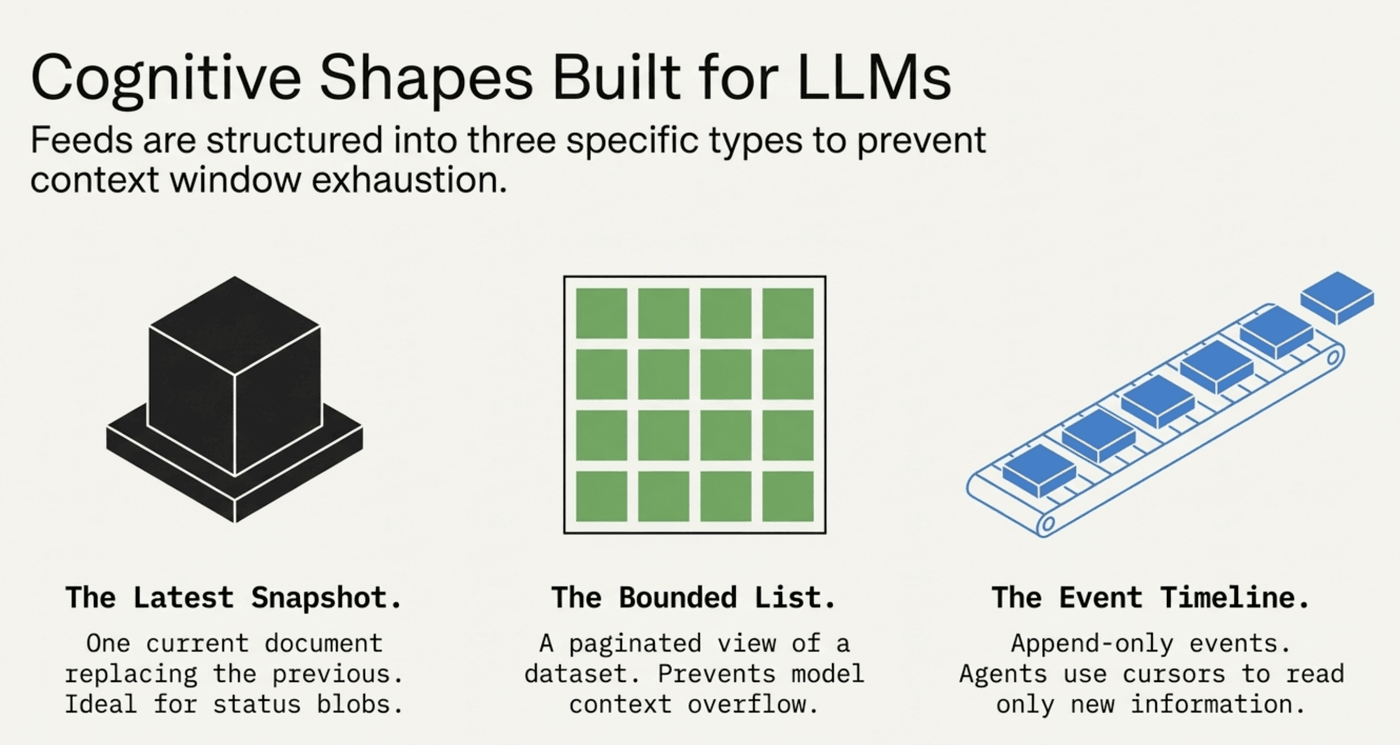
Semantics: Each successful push replaces all stored data for that feed with one document.
payload as a single JSON object (not an array of rows).{
"payload": {
"updated_at": "2026-03-28T12:00:00Z",
"temperature_c": 18,
"summary": "Partly cloudy"
}
}---
2. Collection (feed_type: collection)
Semantics: Each push inserts one or more rows into the latest batch. Consumers see a paginated view of the current batch once you mark it complete.
payload as an array of objects (each object becomes one row). A single object is treated as one row.id field (Mandatory): Each object in the collection must have a unique id. This is used to ensure row consistency and versioning.batch_id (optional): Omit to let the server assign a new id. If you split a large run across multiple HTTP requests, send the same batch_id on every part and set batch_complete": true only on the last request.batch_complete": true: After inserts succeed, the feed’s current batch pointer is updated and rows from older batches (except the previous pointer used for pruning) are removed — so the catalog stays bounded.Multi-chunk example (two HTTP calls, same batch):
{
  "payload": [ { "id": "1", "title": "A" }, { "id": "2", "title": "B" } ],
  "batch_id": "550e8400-e29b-41d4-a716-446655440000",
  "batch_complete": false
}{
"payload": [ { "id": "3", "title": "C" } ],
"batch_id": "550e8400-e29b-41d4-a716-446655440000",
"batch_complete": true
}Best for: Ranked lists, “top N,” any dataset that should be read as one consistent version at a time.
---
3. Stream (feed_type: stream)
Semantics: Each push appends rows. Nothing is replaced wholesale.
payload as an array of objects or a single object (single object = one appended event).id field (Mandatory): Each appended event must have a unique id. This prevents duplicate events from being stored if a push is retried.batch_id / batch_complete flow on stream; consumers paginate and filter with time/cursor as in the Consumer docs.Best for: Activity feeds, logs, news lines, any growing timeline.
{
  "payload": [
    { "id": "evt_1", "type": "push", "created_at": "2026-03-28T12:00:00Z" }
  ]
}
---
Choosing a type
| Need | Type |
|---|---|
| Only the latest single JSON document | Singleton |
| Full list refreshes together; bounded size per version | Collection |
| New events keep arriving; history matters | Stream |
---
Operational notes
batch_id / batch_complete.last_sync_at metadata is updated.---